
 every agent
every claude code session and subagent, in one place.
inside claude code, a session keeps track of its own subagents, and agent view (claude agents) gathers the background sessions you hand off. agent notch lists every claude code session on your mac in the notch, wherever it runs: what each is doing, what you asked it, how long it's been at it, and what each of its subagents is up to.
the claude code facts here are from anthropic's claude code docs, as of 28 november 2026, linked beside them. agent notch is an independent app.
what claude code shows you.
a subagent works inside one session: it takes a side task in its own context window, with its own tools, and hands back a summary. its requests count toward the same usage limits as your main conversation. with nothing configured, a subagent claude starts from your main conversation runs in the background while you keep working, and when one needs permission, the prompt comes to your main session and names the subagent.
to check on them, /tasks lists everything running in the background of the current session, finished subagents included, and named background subagents show their status in the @-mention list.
across sessions, agent view, opened with claude agents, is one screen for your background sessions: what's running, what needs your input and what's done. it's a research preview. the claude desktop app has a view of your sessions too.
from anthropic's claude code docs: subagents, run agents in parallel, agent view.
what agent notch adds.
hover the notch, click it or press ⌥⌘K. every claude code session on your mac is there with its project and the app it runs in, a terminal, vs code or the claude app:
- what it's doing right now, like
running · pnpm testorediting · src/webhooks/stripe.ts; - your last prompt, or its final message once it's done;
- how long the current turn has been running;
- its subagents underneath: what each was asked to do, what it's doing now and for how long.
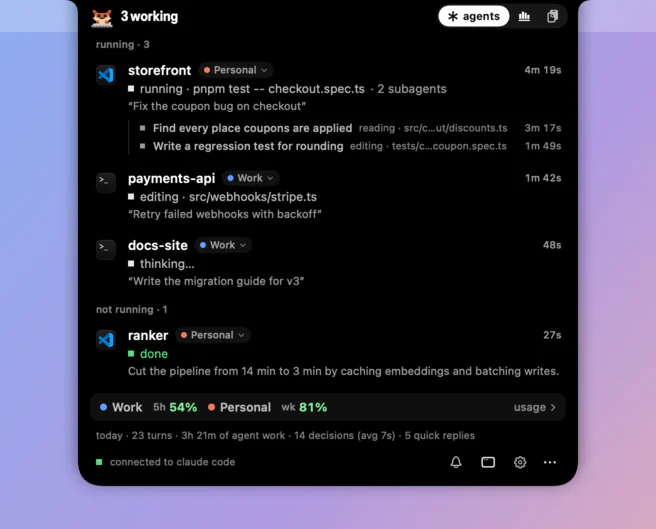
the row is the main chat: its status, last message and replies come from the main conversation only, never from a subagent. when the main chat finishes while background subagents carry on, the row says how many are still working and keeps its last message, and the session counts as working until the last one stops. click a session to jump to its app.
closed, the notch shows how many agents are working, and a yellow badge when one needs you. the dashboard's sessions page lists them too, with the last 7 days of sessions and a resume command to copy for each.
questions.
does it see sessions in vs code and the claude app?
yes. it connects through claude code's hooks, so every session shows, whether it runs in a terminal, in vs code or in the claude app.
do sessions that are already running show up?
new sessions show up straight away. sessions that were already running before you connected agent notch need a restart.
can i answer a subagent's permission prompt from the notch?
yes. the card says which subagent is asking. see answering permission prompts.
what happens if agent notch isn't running?
its hooks exit in about 20 ms without output and claude code behaves exactly as before, so quitting is enough to step out of the way.

put your agents in the notch.
every claude code agent on your mac, in the notch: what it's doing, what it needs from you, and how much of your plan is left.
early price goes to $19 after the first 20 licences.