
 several claude accounts
several claude code accounts on one mac.
claude code can stay signed in to more than one of your accounts if each has its own configuration folder, chosen with CLAUDE_CONFIG_DIR. agent notch builds on that: you sign in to each account once, through claude code's own sign-in, then see what's left on every account and switch a chat to another without signing in again. switching accounts is in beta.
the claude code facts here are from anthropic's claude code docs, as of 28 november 2026, linked beside them. agent notch is an independent app.
how claude code does it.
to stay signed in to several accounts at once, such as work and personal, anthropic's docs give each account its own configuration folder: start claude with CLAUDE_CONFIG_DIR set to that account's folder. each folder has its own settings, session history and claude.ai login. for example, an alias in ~/.zshrc:
alias claude-work='CLAUDE_CONFIG_DIR=~/.claude-work claude'the first time you run claude-work in a new terminal, claude code walks you through signing in for that folder. on a mac the sign-in is kept in the keychain, in an entry tied to that folder, so a session started with another folder reads another entry. in vs code, the claude code extension takes the same variable in its environmentVariables setting, as an absolute path.
without separate folders, moving to another account means /logout and signing in again, which also resets claude code's first-launch setup. and as each folder keeps its own session history, a conversation started under one account isn't in another's.
from anthropic's claude code docs: log in with multiple accounts, credential management, vs code extension settings.
what agent notch adds.
agent notch uses the same idea: each account you add gets its own claude code folder, and you sign in to it once, in your browser, through claude code's own sign-in. then:
see every account at once.
each account's 5-hour and weekly limits, what's left and when each runs out at your pace, side by side in the notch, with one line for all of them together. it warns you before one runs out.
a chat on any account. beta
new chats start on the account with the most room, so your chats spread across your accounts instead of all using up one. every chat in the notch shows its account: click it and pick another, and the chat moves after its turn, or stop the chat to move it now. the same chat then carries on in its own vs code tab from its next message. nothing is copied: your accounts share one set of conversations.
a chat in a terminal moves once you close that terminal, and opens as the other account in a new window. chats in the claude app sign in on their own, so they stay put.

when one runs out. beta
15 minutes before an account's 5-hour limit runs out at your pace, or when it reaches a limit, the alert names your account with the most room, and by default its chats in vs code move there by themselves, each when its turn ends, never in the middle of one. set when an account is running out to ask me and the alert offers to move them instead. a move puts new work on the other account's own plan; it doesn't add to the one running out.
one switch. beta
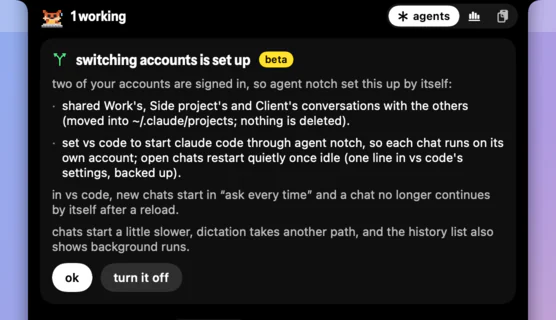
all of this sits behind one setting, switch accounts. once two of your accounts are signed in, agent notch sets it up by itself and tells you what it did: it moves each account's own conversations into one shared folder, ~/.claude/projects (nothing is deleted), and adds one line to vs code's settings, backed up first. one switch turns it off.
you sign in. agent notch never does.
you add each account once and sign in yourself, in your browser, through claude code's own sign-in. claude code keeps each account in its own folder; agent notch never sees, stores or moves a password or token.
your accounts share one set of conversations, so a chat can switch accounts without a copy, and nothing is deleted. each account keeps its own plan and its own limits. accounts must be your own: a team seat belongs to the person it's assigned to.
switching accounts is in beta. in the app's words: it works on the mac it was built on, and it depends on how the claude code extension in vs code behaves, which can change when the extension updates. conversations are never deleted.
questions.
how does it sign in to my claude accounts?
it doesn't: you do. you sign in to each of your accounts yourself, in your browser, through claude code's own sign-in, and claude code keeps each one in its own folder on your mac. agent notch never sees, stores or moves a password or a sign-in token. it only reads the usage claude code reports, and tells claude code which of your folders to use. the accounts stay yours, and anthropic's terms for them apply as they always did.
does it give me more claude usage?
no. it shows the limits your plan already has and warns you before you run out. if you have more than one account of your own, it shows them side by side and lets you switch between them.
can it move a chat that's in the middle of something?
yes, but never in the middle of a turn. a chat you move waits for its turn to end, or moves as soon as you stop it yourself. then the same chat carries on as the other account from its next message; nothing is copied. a chat in a terminal moves once you close its terminal. once switching accounts is on, a setting also moves an account's chats after their turn when it runs low, or asks you first if you set it to.
does it change anything on my mac without asking?
once two of your accounts are signed in, yes, once: it sets up account switching by itself and tells you right away what it did. it moves each account's own conversations into one shared folder, ~/.claude/projects, so every account can read them (nothing is deleted), and adds one line to vs code's settings, after backing the file up, so each chat can run on its own account (chats open in vs code then restart quietly once they're idle). one switch turns it off: the line in vs code's settings comes out again, but the conversations stay in the shared folder, where every account still reads them. with one account it changes nothing, and if you switched it off before, it stays off.

put your agents in the notch.
every claude code agent on your mac, in the notch: what it's doing, what it needs from you, and how much of your plan is left.
early price goes to $19 after the first 20 licences.