agent notch

works with claude code

your claude code agents and accounts, in the notch.

see every agent, answer from the notch, and switch claude accounts without signing in again.

not on sale just yet see it work

one payment · 3 macs · updates included · macOS 14 or later

the app itself, recorded with made-up projects and accounts.

why i built it

  1. before

    one claude account runs out in the middle of the work. i log out, wait for the sign-in code, sign in as the next one, reopen everything. somewhere an agent finished ten minutes ago, and another is waiting on a yes i never saw.

  2. then

    so i built agent notch.

    the closed notch at the top of a mac's screen: kit the pixel fox at its keyboard, the week's 81% left, and 3 agents at work.
  3. now

    • every agent sits where i already look.
    • new chats start on whichever account has the most room.
    • it warns me before a limit, and moves my chats on when one runs out.

    the account part is in beta. once two accounts are signed in it sets itself up and says what it did; one switch in settings turns it off.

in the notch

every agent. one hover away.

hover the notch, click it or press ⌥⌘K. every claude code session on your mac, in a terminal, in vs code or in the claude app: what it's doing, what you asked it, how long it's been at it, and what each of its subagents is up to.

answer it from the notch.

permission prompts, questions and plans drop from the notch as cards: the command, the real diff or the plan, with a chip for what's risky, like force push, deletes files or outside the project.

allow, deny, tell claude what to do instead, or always allow. answered in the terminal first? the card goes by itself.

⌥⌘Y allow ⌥⌘N deny ⌥⌘A always allow ⌥⌘1–4 an answer

recording: a card drops from the notch, 'run this command?' for git push --force-with-lease in storefront, with a red force push chip, deny, tell claude, always allow and allow. it's allowed and goes. then 'claude has a question' for docs-site: which upgrade path should the guide lead with, with three numbered answers and something else. the first answer is picked and the card goes.

reply in one click.

when an agent finishes by asking you something, offering more work or leaving something open, the notch shows its last message with the likely replies. one click sends one, and the chat carries on. a plain answer gets no buttons.

suggested replies are asked of claude haiku through your own claude code, and use a little of your plan. one switch turns them off; replies taken from the message itself keep working.

recording: 'payments-api finished · 4m 12s' drops from the notch with claude's last message and a reply taken from it, 'yes, add a dead-letter queue for them'. two suggested replies arrive beside it, 'alert on retry spikes' and 'commit and open a pr'. one is sent, and the notch says 'sent to payments-api'.

kit keeps watch.

a pixel fox beside the camera, drawn for agent notch. it types while your agents work, waves when one needs you, hops when one is done, and curls up when all is quiet. you can tell how things are going without opening anything.

recording of the closed notch beside 'wk 81%' through a stretch of a day: kit sits; an agent starts and kit types at a little keyboard; it thinks; one needs you and kit jumps and waves, cheeks yellow, beside a yellow 1; it types again; one finishes and kit hops with sparkles, chest green; then alerts are paused and kit curls up asleep under a little cloud.
  • sitting
  • at work
  • thinking
  • needs you
  • finished
  • asleep

several claude accounts

all your claude accounts.
one click apart.

sign in to each once. then see what's left on every account, and move any chat to another. when one runs out, its chats move on. no signing in again. switching accounts is in beta.

  1. see every account at once.

    each account's 5-hour and weekly limits, what's left and when each runs out at your pace, side by side in the notch and on the accounts page, with one line for all of them together. agent notch warns you before one runs out: early, when it's on course to run out well before it resets, then 15 minutes before it does (you can pick 5 to 60) and again at 5.

    each warning comes once per limit window, in the notch and, if you allow it, as a mac notification.

    recording of the notch's usage screen with four accounts. on top, one line for all of them: 4 accounts, with the run-out warning that work's week runs out early at this rate. then a row each with its 5-hour and weekly percent left and when it resets or runs out: personal, in use with its chats; work at 0% of its 5-hour limit, back at a time shown; side project marked next, where new chats start; client. each account's detail opens in turn: work's 5-hour session used up and its week running out early, side project's limits on pace, client's week.
  2. a chat on any account. beta

    each of your own accounts has its own limits, and new chats start on the account with the most room, so your chats spread across your accounts instead of all using up one. every chat in the notch shows its account. click it and pick another: the chat moves after its turn, or stop the chat to move it now. then the same chat carries on in its own vs code tab from its next message. nothing is copied: your accounts share one set of conversations.

    a chat in a terminal moves once you close that terminal, and opens as the other account in a new window. chats in the claude app sign in on their own, so they stay put.

    recording: payments-api is editing in vs code under personal. its account opens 'switch this chat to', tagged beta: personal ticked, work, side project (marked as the one with most room) and client with what each has left, and 'stop the chat to switch now, or it switches after this turn'. work is picked, and the row says: work, stop the chat to switch now, or it switches after this turn, with cancel. the chat is stopped: it says stopped, its account says work, and the row says now on work, type continue. with the next message, continue, it runs on work, in the same row.
  3. when one runs out. beta

    15 minutes before an account's 5-hour limit runs out at your pace, or when it reaches a limit, the alert names your account with the most room. by default its chats in vs code move there by themselves, each when its turn ends, never in the middle of one. prefer to be asked? set when an account is running out to ask me, and the alert offers to move them in one click instead.

    it moves a chat only on a fresh reading, to an account that's signed in and has room, and the same chat at most once in 15 minutes. a chat whose turn ended on the limit moves the same way; type continue to carry on. a move puts new work on the other account's own plan; it doesn't add to the one running out.

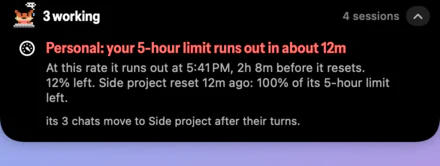
    a red alert in the notch: 'personal: your 5-hour limit runs out in about 12m. at this rate it runs out at a time shown, 2h 8m before it resets. 12% left. side project reset 12m ago: 100% of its 5-hour limit left.' then: its 3 chats move to side project after their turns.
  4. one switch. beta

    all of this sits behind one setting, switch accounts. once two of your accounts are signed in, agent notch sets it up by itself and tells you what it did: it moves each account's own conversations into one shared folder, ~/.claude/projects (nothing is deleted), and adds one line to vs code's settings, backed up first. one switch turns it off: that line comes out again, and the conversations stay shared.

    if you switched it off before, it stays off. switching accounts is in beta. in the app's words: it works on the mac it was built on, and it depends on how the claude code extension in vs code behaves, which can change when the extension updates. conversations are never deleted.

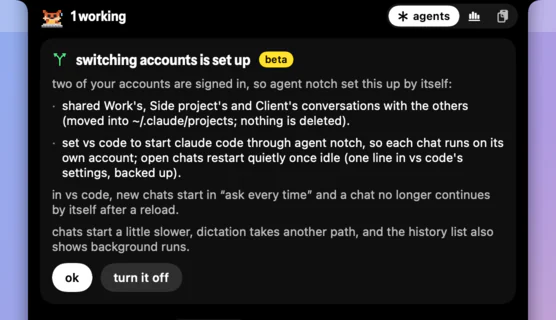
    the open notch the first time it's seen after setting itself up: 'switching accounts is set up', tagged beta. two of your accounts are signed in, so agent notch set this up by itself: shared work's, side project's and client's conversations with the others (moved into ~/.claude/projects; nothing is deleted); set vs code to start claude code through agent notch, so each chat runs on its own account; open chats restart quietly once idle (one line in vs code's settings, backed up). then what that means in vs code: new chats start in 'ask every time', a chat no longer continues by itself after a reload, chats start a little slower, dictation takes another path, the history list also shows background runs. buttons: ok, and turn it off.

plan limits

your limits. before you run out.

your plan's limits as % left beside the camera: the week, a model's own week, and the 5-hour session on plans that have one. the same numbers as /usage, read from claude code itself.

at your pace, agent notch works out when a limit will run out and tells you early, again when it's close, and when it's reached. on pace, it says how much you'll have to spare.

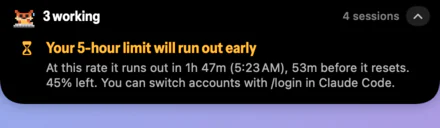
an amber alert in the notch: 'your 5-hour limit will run out early. at this rate it runs out in 1h 47m, 53m before it resets. 45% left.'

where the tokens went.

the dashboard counts every token claude code used on this mac, from its own logs: by model, project, session, agent and hour, with filters that combine. it also lists your sessions, launchd jobs, saved commands and local servers, in your mac's light or dark look.

on a claude plan you aren't billed per token, so costs never lead.

recording of the agent notch dashboard: the overview (live sessions, what needs you, the week's % left with pixel meters, automations), then usage: the plan card and tokens per day, the last 30 days split by project with a tooltip, the main agent against each kind of subagent, and when you use claude by hour.

clipboard

what you copy. kept for you.

a searchable history of text, links, code, colours, screenshots, files and airdrops, with the text inside pictures read on your mac. press ⌃⌘V anywhere, type a few letters and press return to paste.

anything that looks like a password, key or card number is masked and never written to disk.

recording of quick paste: control-command-v opens the clips screen with its search field ready, typing 'prom' narrows it to three saved prompts, the arrow keys move along them and return pastes one.

claude can read it, if you let it.

switch it on and claude code can look through your kept clips when you ask: "use the error i copied", "what does my last screenshot say". it's a small read-only server on your mac, off until you switch it on, and passwords and keys are never shared.

agent notch's settings: 'let claude read your clipboard history', on for personal and work. claude code can look through your kept clips when you ask, and anything it reads becomes part of that conversation. passwords, keys and tokens are never shared.

everything stays on your mac.

no account. no analytics.

your sessions, clips, usage and settings live in ~/.agent-notch, on your mac. none of it is sent to us.

your sign-in stays yours.

agent notch never touches your claude sign-in tokens: it never reads, copies or stores them. claude code handles its own sign-in.

a licence check, updates and the price. nothing else.

to activate, and about once a day after, the app sends your key, an instance id and a generic device name to dodo payments. once a day it asks this site for the newest version, which you can switch off, and until you activate it asks this site for the price, about once an hour; those two requests carry nothing about you. plan limits and suggested replies go through your own claude code.

buy it once. keep it.

no subscription and no account to make. use it on up to 3 of your macs, with every update included.

what you need

  • a mac with macOS 14 or later. a macbook with a notch is its natural home; on other displays agent notch draws its own notch at the top of the screen.
  • claude code, in a terminal, in vs code or in the claude app.
  • for plan limits, a claude subscription sign-in. with an api key there are none to show.

agent notch

one payment. no subscription.

$9

  • works on up to 3 of your macs
  • updates included
  • macOS 14 or later; a mac with a notch looks best
  • works with claude code
not on sale just yet

checkout by dodo payments, the merchant of record. they handle the payment, tax and your receipt, and email your licence key.

questions.

what do i need?

a mac with macOS 14 or later, and claude code. a macbook with a notch is its natural home; on other displays agent notch draws its own notch at the top of the screen. plan limits need a claude subscription sign-in; with an api key there are none to show.

how many macs can i use it on?

one licence works on up to 3 of your macs. moving to a new mac and out of spots? write to us and we'll sort it out.

is it a subscription?

no. one payment, yours to keep, with updates included.

what about refunds?

the refund policy has the details.

what does it send, and where?

your sessions, clips, usage and settings stay on your mac, and the app never touches your claude sign-in tokens. to check your licence it sends your key, an instance id and a generic device name to dodo payments, who sell it for us, and it asks this site for the newest version once a day and, until you activate, for the price. plan limits and suggested replies go through your own claude code. the privacy policy says exactly what goes where.

does it give me more claude usage?

no. it shows the limits your plan already has and warns you before you run out. if you have more than one account of your own, it shows them side by side and lets you switch between them.

how does it sign in to my claude accounts?

it doesn't: you do. you sign in to each of your accounts yourself, in your browser, through claude code's own sign-in, and claude code keeps each one in its own folder on your mac. agent notch never sees, stores or moves a password or a sign-in token. it only reads the usage claude code reports, and tells claude code which of your folders to use. the accounts stay yours, and anthropic's terms for them apply as they always did.

does it change anything on my mac without asking?

once two of your accounts are signed in, yes, once: it sets up account switching by itself and tells you right away what it did. it moves each account's own conversations into one shared folder, ~/.claude/projects, so every account can read them (nothing is deleted), and adds one line to vs code's settings, after backing the file up, so each chat can run on its own account (chats open in vs code then restart quietly once they're idle). one switch turns it off: the line in vs code's settings comes out again, but the conversations stay in the shared folder, where every account still reads them. with one account it changes nothing, and if you switched it off before, it stays off.

can it move a chat that's in the middle of something?

yes, but never in the middle of a turn. a chat you move waits for its turn to end, or moves as soon as you stop it yourself. then the same chat carries on as the other account from its next message; nothing is copied. a chat in a terminal moves once you close its terminal. once switching accounts is on, a setting also moves an account's chats after their turn when it runs low, or asks you first if you set it to.

is it made by anthropic?

no. agent notch is an independent app that works with claude code. it isn't affiliated with or endorsed by anthropic.

who takes the payment?

dodo payments, the merchant of record. they take the payment, handle tax and receipts, and email your licence key. this site keeps only a record that a sale happened.

put your agents in the notch.

not on sale just yet

one payment · 3 macs · updates included · macOS 14 or later