
 plan limits
claude code's usage limits, and when they reset.
on a claude plan, claude code works within a session limit over a rolling 5-hour window and a weekly limit, and your use counts against both at once. run /usage to see how much of each is used and when it resets. agent notch keeps the same numbers beside your mac's camera as % left, and tells you before one runs out.
the claude code facts here are from anthropic's claude code docs, as of 28 november 2026, linked beside them. agent notch is an independent app.
how the limits work in claude code.
claude code on a claude subscription has a rolling usage allowance with two windows: a session limit over 5 hours and a weekly limit. every request counts against both at the same time, so a burst of heavy work can use up the week before the 5-hour window resets. there can also be a limit for one model family, such as an opus or a sonnet limit.
when a limit runs out, claude code stops sending requests and says when it comes back:
You've hit your session limit · resets 3:45pm
You've hit your weekly limit · resets Mon 12:00am
the session and weekly limits are shared across all models, so switching models with /model doesn't bring access back; after an opus or sonnet limit, a model outside that family keeps you working. in an interactive session signed in with a claude subscription, claude code can wait and carry on the interrupted task after the reset by itself.
checking what's left
/usageshows your plan's usage limits. on pro, max, ultra, team and enterprise plans it also breaks down what counted against them over the last 24 hours or 7 days, worked out from session history on this machine./costand/statsopen the same screen.- before a window runs out, claude code can warn you, with a line such as
You've used 85% of your session limit · resets 3:45pm. - a custom status line can show the
rate_limitsfields: how much of the 5-hour and 7-day windows is used, and when each resets. they're there for pro, max and ultra subscribers, after the session's first reply.
from anthropic's claude code docs: usage limit errors, costs and /usage, commands, status line: rate limits, waiting for a reset.
what agent notch adds.
your plan's limits as % left, beside the camera: the week, a model's own week, and the 5-hour session on plans that have one. they're the same numbers as /usage, asked of your installed claude code under your own sign-in; no model call is made and no tokens are used. green while there's plenty, amber under 30%, red under 12%.
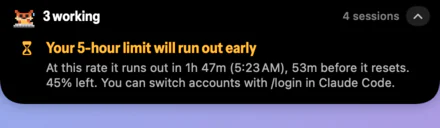
from your pace, it works out when each limit will run out. on pace, it says how much you'll have to spare. if not, the time left shows beside the number, and it warns you: early, when your pace first shows a limit running out well before it resets; again when it's close (15 minutes before by default, or 5, 10, 30 or 60) and at 5 minutes; when a limit is 90% used but still on course to last; and when one is reached. each warning comes once per limit window, in the notch and, if you allow it, as a mac notification.
the usage screen shows every limit with its pace and its reset, as a countdown and a clock time. with several accounts of your own, each gets its own row, and each keeps its own plan and its own limits; see multiple claude code accounts.

questions.
does it give me more claude usage?
no. it shows the limits your plan already has and warns you before you run out. if you have more than one account of your own, it shows them side by side and lets you switch between them.
where do the numbers come from?
from claude code itself: the same data as /usage, fetched by your installed claude code under your own sign-in. it checks every 3 minutes while agents work, every 10 when they're idle, and every minute when a limit is close.
how does it know when a limit will run out?
from your pace: your average since the window opened and your recent pace, and it takes the sooner of the two, so a warning is never late. it's an estimate, not a promise.
does it work with an api key?
plan limits need a claude subscription sign-in; with an api key there are none to show.

put your agents in the notch.
every claude code agent on your mac, in the notch: what it's doing, what it needs from you, and how much of your plan is left.
early price goes to $19 after the first 20 licences.